Month End Offer : Get 30% OFF + $999 Study Material FREE - SCHEDULE CALL
A sql service account is an explicitly created user account designed to establish a security framework for services operating on Windows Server operating systems. The security context dictates the service's ability to access local and network resources.Windows operating systems depend on services to operate various functions. You can configure these services through applications, the Services snap-in, Task Manager, or Windows PowerShell.Want to excel in this subject? Opt for SQL Server Online Training & Certification Course. It will make you understand the real-time working of SQL language and how it is applied in different industries and roles, including Data Analysis and reporting environments.
The SQL Server Service runs under the account of the computer. The SQL Server Service has access to network resources, but under the context of the computer account, not under its account. The SQL Server Service runs under the service-specific account called NT Service\MSSQLSERVER. Many entry-level Database Administrators (DBAs) often grapple with the concept of service accounts and which one is optimal for specific situations.
This blog clarifies this topic for you. Depending on your choices during the SQL Server installation, various services will be installed on your server.
You can configure your SQL Server related services either during the setup or after the installation using the SQL Server Configuration Manager.

SQL Server Service Account
Following are the types of Service accounts available in SQL Server
Where can you see the Local System, Local Service, and Network Service accounts? These Windows in-built accounts are part of the operating system and assigned to the users; you cannot use the account to log in to the system. These accounts are meant to be used for securing and authentication mechanisms.
If you have a combination of SQL Server 2008 or above and Windows Server 2008 or above, then SQL Server will be installed using an operating system feature called Service Isolation. In terms of user accounts, all user accounts have a unique identifier we call a SID (Security Identifier). With Windows Server 2008, services also have SIDs. This was implemented for situations where multiple services are running under the same account (for instance, Network Service or System). Still, these services shouldn't have access to resources belonging to other services that share the same service account. As a result, each service now has a SID. Any sql developer knows how to add service account to sql sever.
SQL Server 2008 and later versions offer a means to ensure that the service itself, rather than just the account, possesses the necessary permissions for database resources. For example, in the illustration below, you'll observe that logins are attributed to NT Service\MSSQL$SQL2008R2 (representing a SQL Server 2008R2 named instance named SQL2008R2) and its corresponding SQL Agent service, NT Service\SQLAgent$SQL2008R2. This association arises from service isolation.In this scenario, the sole path to obtaining sysadmin-level access is by accessing SQL Server through these services. Even if the service account were to be compromised, unless one of these services established a connection, the compromised account would lack any privileges within SQL Server.

Use of SQL Server Service Account:
SQL Server service accounts allow SQL Server to run with the rights and privileges assigned to the service account.
Changing Service Accounts:
As mentioned above, SQL Server service accounts can be configured during installation or using SQL Server Configuration Manager. The first one is part of the installation and can be configured during the step Instance Configuration. I would walk you through changing a service account using SQL Server Configuration Manager.
1. Start -> Programs Microsoft SQL Server 2008 -> Configuration Tools -> SQL Configuration Manager

2. Highlight a service in the right pane, right click for properties.

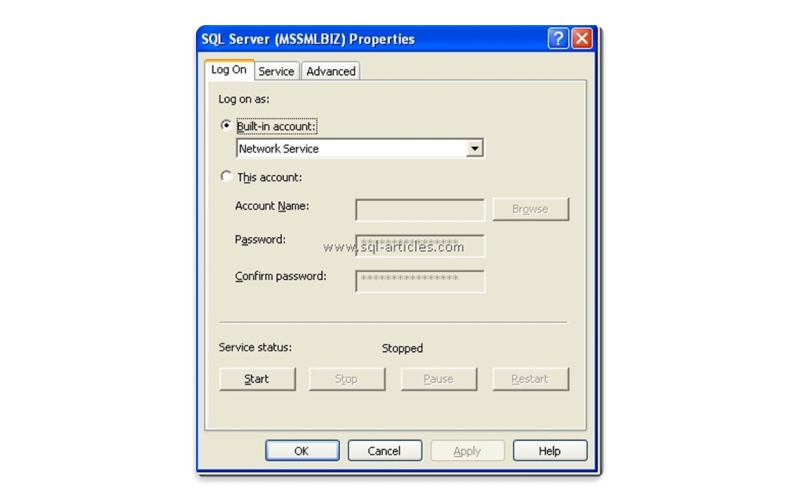
You can change the built-in account here if you would like to change it to a Local User account or a domain user account, choose option This Account to Ungray it and enter the credentials of a local or a domain user account.Remember to restart the SQL Server and related services for the new Service account to take effect.
SQL Training For Administrators & Developers

The blog details the different aspects of SQL Server Service accounts. It describes SQL Server Service Accounts, sql server service account best practices, different types of SQL Server Service accounts, and how to create sql service accounts. It also discusses its use and how to switch between different service accounts. This will be a good read for those who aspire to become a DBA.But suppose you are still unsure of what is a service account in sql server or how to create service account for sql server. In that case, you can always opt for a self-learning sql online certification or SQL Server DBA Training & Certification. Learn from scratch, from creating a service account to using different SQL accounts.
If you are a beginner, watch this video to learn What is Microsoft(MS) SQL Server.

Database Files-Heart of SQL Server Database
 Apr 26, 2023
  6.3k
6.3k
Data Definition Language (DDL) Commands in SQL
May 15, 2023 5.6k
Different Types of DBAs and Their Roles
Aug 22, 2023 5.4k
What is Schema in SQL With Example: All You Need to Know
May 24, 2023 4.9k
Gen AI

Agentic AI

AI in Automation Testing

Cyber Security

Data Science

QA

Salesforce

AWS
Download Syllabus
Get Complete Course Syllabus
Enroll For Demo Class
It will take less than a minute
Tutorials
Interviews
You must be logged in to post a comment