Month End Offer : Get 30% OFF + $999 Study Material FREE - SCHEDULE CALL
While working with a database, you might sometimes face two scenarios. In one scenario, you have a field that cannot accept null values. At the same time, you want to make an arrangement such that if you miss out on entering a value in that field the system will automatically take care of it. Or otherwise, it will put a value you set previously on your behalf. The other scenario is that you want to find out or validate the data that is being entered into the system. SQL Server allows both of these to happen using the Default and the Check constraint. Over the following few paragraphs, we will learn about check and default constraints in SQL.

Rules for a table's data can be specified with the help of SQL constraints.The type of data that can be entered into a table can be restricted with constraints. This guarantees the reliability and accuracy of the data in the table. The action is aborted if there is a violation between the constraint and the data action. Column-level or table-level constraints are possible. Constraints at the table level apply to the entire table, whereas those at the column level apply to a single column.
In SQL, the following constraints are frequently used:
Using the MS SQL CHECK constraint, a column's value range can be restricted.A column with a SQL Server CHECK constraint on it will only allow specific values.A CHECK constraint can limit the value specificrtain columns based on values in other columns in the row if it is applied to a table.We will then learn how to use a DBMS check constraint and learn to check constraints in SQL.
The following are some of the benefits of SQL Server Check Constraints:
The disadvantages of MS SQL Check Constraints are as follows
CHECK constraints reject FALSE-valued values. A constraint may be overridden by the presence of null values in expressions because they evaluate to UNKNOWN.
SQL CHECK Constraint on CREATE TABLE
The following SQL creates a CHECK constraint on the "Age" column when the "Persons" table is created. The CHECK constraint ensures that the age of a person must be 18 or older: The SQL Query is as follows
CREATE TABLE Persons_check (

ID int NOT NULL,

LastName varchar(255) NOT NULL,

FirstName varchar(255),

Age int CHECK (Age>=18)

);
The output looks like below

To allow the naming of a CHECK constraint, and for defining a CHECK constraint on multiple columns, use the following SQL syntax:
CREATE TABLE Persons_Check1 (

ID int NOT NULL,

LastName varchar(255) NOT NULL,

FirstName varchar(255),

Age int,

City varchar(255),

CONSTRAINT CHK_Person CHECK (Age>=18 AND City='Sandnes')

);
The output is as below

SQL Server Check Constraint on Alter Table
To create a CHECK constraint on the "Age" column when the table is already created, use the following SQL:
ALTER TABLE Persons
ADD CHECK (Age>=18);
To allow naming of a CHECK constraint, and for defining a CHECK constraint on multiple columns, use the following SQL syntax:
ALTER TABLE Persons
ADD CONSTRAINT CHK_PersonAge CHECK (Age>=18 AND City='Sandnes');
Drop a SQL Server Check Constraint
To drop a CHECK constraint, use the following SQL:
ALTER TABLE Persons
DROP CONSTRAINT CHK_PersonAge;
The DEFAULT constraint is used to set a default value for a column.The default value will be added to all new records if no other value is specified.
The uses of SQL Default Constraint are
A column's default value can be set with the SQL DEFAULT constraint. If no other value is specified, all new records will have the default value added to them.
Disadvantages of SQL Default Constraint are as follows
Create Default Constraint in SQL Server
The following SQL sets a DEFAULT value for the "City" column when the "Persons" table is created: The SQL query is as follows
CREATE TABLE Persons_default (
ID int NOT NULL,
LastName varchar(255) NOT NULL,
FirstName varchar(255),
Age int,
City varchar(255) DEFAULT 'Sandnes'
);
The output looks like below
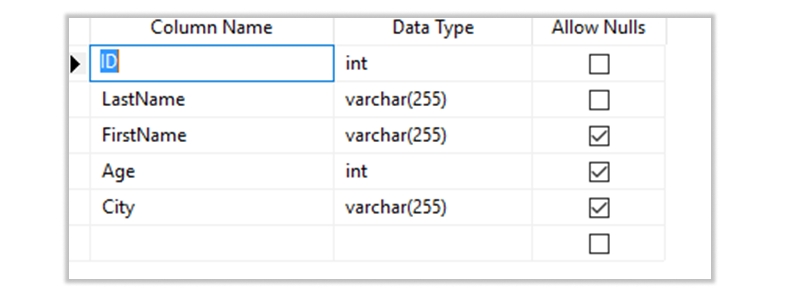
The DEFAULT constraint can also be used to insert system values, by using functions like GETDATE(: The SQL query looks like this below
CREATE TABLE Orders (
ID int NOT NULL,
OrderNumber int NOT NULL,
OrderDate date DEFAULT GETDATE()
);
The output looks like below

To create a DEFAULT constraint on the "City" column when the table is already created, use the following SQL:
ALTER TABLE [dbo].[Persons_default]
ADD CONSTRAINT df_City
DEFAULT 'Sandnes' FOR City;
DROP a SQL DEFAULT Constraint
To drop a DEFAULT constraint, use the following SQL:
ALTER TABLE Persons
ALTER COLUMN City DROP DEFAULT;
Over the last few paragraphs, we learned about Check and Default Constraints in SQL. We learned their uses, advantages, and disadvantages. Hope this becomes an introductory text for people who want to learn more about these two constraints and if you wander what MySQL check constraint is can do that too.

SQL Testing Training

Database Files-Heart of SQL Server Database
 Apr 26, 2023
  6.3k
6.3k
Data Definition Language (DDL) Commands in SQL
May 15, 2023 5.7k
Different Types of DBAs and Their Roles
Aug 22, 2023 5.4k
What is Schema in SQL With Example: All You Need to Know
May 24, 2023 4.9k
Gen AI

Agentic AI

AI in Automation Testing

Cyber Security

Data Science

QA

Salesforce

AWS
Download Syllabus
Get Complete Course Syllabus
Enroll For Demo Class
It will take less than a minute
Tutorials
Interviews
You must be logged in to post a comment