

About this question
In Visualforce, we could merge {!TODAY()} directly in the markup. What is the equivalent in a Lightning Component? How can javascript get today's date in lightning component?
In Visualforce, we could merge {!TODAY()} directly in the markup. What is the equivalent in a Lightning Component? How can javascript get today's date in lightning component?
Log in to share your answer and help other learners.
Log in to answerBest Answer · By JanBask Salesforce Expert
Ankur Vaish JanBask Expert
Answered on Apr 23, 2021
You need a slight modification to the JS you proposed, as you will run into comparison errors if the day is a single digit as well. Modifying the script like so fixed the problem:
var today = new Date(); var monthDigit = today.getMonth() + 1; if (monthDigit <= 9) { monthDigit = '0' + monthDigit; } var dayDigit = today.getDate(); if(dayDigit <= 9){ dayDigit = '0' + dayDigit; } component.set('v.today', today.getFullYear() + "-" + monthDigit + "-" + dayDigit);This way javascript get today's date
Ranjana Admin JanBask Expert Latest answer
Answered on Jul 1, 2024
To quickly get today's date in a Lightning Component and use it in an attribute, you can leverage JavaScript within your component's controller or helper. Here’s a step-by-step guide on how to achieve this:
Step 1: Define the Attribute in the Component
First, define an attribute in your Lightning Component to hold today's date.
Step 2: Set the Date in the Component's Controller or Helper
You need to set the value of the todayDate attribute when the component is initialized. You can do this in the controller or helper.
Option 1: Using Controller (JavaScript)
Create a controller file if it doesn’t already exist, and set the date when the component initializes.
({ doInit: function(component, event, helper) { // Get today's date let today = new Date(); // Format the date as a string (e.g., YYYY-MM-DD) let formattedDate = today.toISOString().split('T')[0]; // Set the attribute component.set("v.todayDate", formattedDate); }})Option 2: Using Helper (JavaScript)Alternatively, you can set the date in the helper and call it from the controller.javascriptCopy code// Controller({ doInit: function(component, event, helper) { helper.setTodayDate(component); }})// Helper({ setTodayDate: function(component) { // Get today's date let today = new Date(); // Format the date as a string (e.g., YYYY-MM-DD) let formattedDate = today.toISOString().split('T')[0]; // Set the attribute component.set("v.todayDate", formattedDate); }})Step 3: Initialize the Component
Ensure that the doInit method is called when the component is initialized.
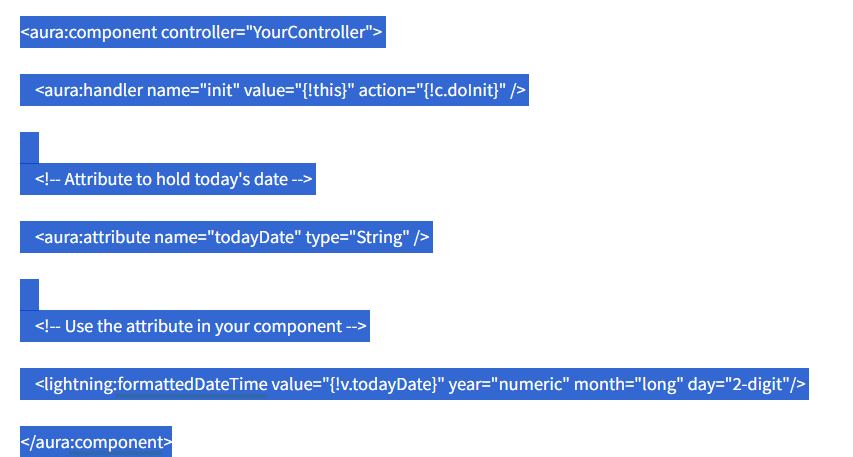
Explanation
Attribute Definition: The aura:attribute tag defines a component attribute named todayDate to store the date.
Initialization Handler: The aura:handler is used to call the doInit function when the component is initialized.
Controller or Helper Logic: The logic in the controller or helper gets today's date using JavaScript's Date object, formats it to a string (e.g., YYYY-MM-DD), and sets the component attribute todayDate.
This setup ensures that when your Lightning Component is initialized, it automatically gets and displays today's date.
Free tutorials and interview questions from industry experts — learn the skill, then get ready to prove it.
Step-by-step Salesforce guides from industry experts
Common Salesforce interview questions, answered
Guides, tips and career advice on Salesforce from JanBask experts.
 Salesforce How to Get Into Salesforce With No Experience
Wondering if you can get a Salesforce job with no experience? Learn how to pick a career path, build real skills, and land your…
Salesforce How to Get Into Salesforce With No Experience
Wondering if you can get a Salesforce job with no experience? Learn how to pick a career path, build real skills, and land your…
 Salesforce How to Become a Salesforce Developer Without Experience
No coding background? Learn how to become a Salesforce Developer step by step - skills to build, projects to create, and how to…
Salesforce How to Become a Salesforce Developer Without Experience
No coding background? Learn how to become a Salesforce Developer step by step - skills to build, projects to create, and how to…
 Salesforce How to Become a Salesforce Admin With No Experience
No Salesforce Admin experience? Learn how to build real skills, create projects, and land an entry-level Salesforce Admin job…
Salesforce How to Become a Salesforce Admin With No Experience
No Salesforce Admin experience? Learn how to build real skills, create projects, and land an entry-level Salesforce Admin job…
 Salesforce How Long Does It Take to Become a Salesforce Developer?
Wondering how long to learn Salesforce Developer? Most beginners need 6–12 months. See the study time, stage-by-stage roadmap and…
Salesforce How Long Does It Take to Become a Salesforce Developer?
Wondering how long to learn Salesforce Developer? Most beginners need 6–12 months. See the study time, stage-by-stage roadmap and…