

About this question
I am currently working on a particular project in Salesforce and I have encountered an issue where the “keyword” field is not writeable. How can I troubleshoot and resolve this issue and what steps should I take to resolve it?
I am currently working on a particular project in Salesforce and I have encountered an issue where the “keyword” field is not writeable. How can I troubleshoot and resolve this issue and what steps should I take to resolve it?
Log in to share your answer and help other learners.
Log in to answerBest Answer · By JanBask Salesforce Expert
Answered on Jun 20, 2024
In the context of Salesforce, here is how you can troubleshoot and resolve this particular issue:-
Verify the field permission
First, you would need to check the field-level security settings for the “keyword” field. Try to ensure that the profile or permission should be set associated with your users has the necessary permission for this field.
Checking field accessibility
You should try to confirm that the “keyword” field is not marked as read-only in the page layout assigned to the record’s object. It is marked as read-only users won’t be able to edit its value.
Review validation rules
You should look at any validation rules that might be preventing updates to the keyword field. Sometimes, validation rules can restrict certain values or even actions.
Consider record types and page layout
If your Salesforce org has multiple record types then you should ensure that the record type is in use allowing editing of the keyword field. Also, try to verify that the correct page layout is assigned to the record types.
Here is the java based example given below:-
Public class UpdateKeywordField {
    Public static void updateProductKeyword(String productId) {
        Try {
            // Retrieve the Product record using its ID
            Product__c product = [SELECT Id, Name, Keyword__c FROM Product__c WHERE Id = roductId LIMIT 1];
            // Check if the ‘Keyword’ field is writeable for the current user
            If (Schema.sObjectType.Product__c.fields.Keyword__c.isUpdateable()) {
                // Check some conditions before updating the ‘Keyword’ field
                If (product.Name != null && product.Name.startsWith(‘A’)) {
                    Product.Keyword__c = ‘Category A’;
                } else {
                    Product.Keyword__c = ‘Other Category’;
                }
                // Update the Product record
                Update product;
                System.debug(‘Keyword field updated successfully.’);
            } else {
                System.debug(‘Keyword field is not writeable for the current user.’);
                // You can add further error handling or notification logic here
            }
        } catch (Exception e) {
            System.debug(‘Error updating Keyword field: ‘ + e.getMessage());
            // Handle the exception as per your requirement
        }
    }
}
Here is the python based example given below:-
Class Product:
    Def __init__(self, product_id, name, keyword):
        Self.product_id = product_id
        Self.name = name
        Self.keyword = keyword
    Def update_keyword(self):
        Try:
            # Check if the ‘Keyword’ field is writable for the current user
            If self.is_field_writable(‘Keyword’):
                # Check some conditions before updating the ‘Keyword’ field
                If self.name and self.name.startswith(‘A’):
                    Self.keyword = ‘Category A’
                Else:
                    Self.keyword = ‘Other Category’
                # Update the ‘Keyword’ field for the product
                Self.save_to_database()
                Print(‘Keyword field updated successfully.’)
            Else:
                Print(‘Keyword field is not writable for the current user.’)
                # You can add further error handling or notification logic here
        Except Exception as e:
            Print(f’Error updating Keyword field: {e}’)
            # Handle the exception as per your requirement
    Def is_field_writable(self, field_name):
        # Simulating field permissions – return True for demonstration purposes
        Return True
    Def save_to_database(self):
        # Simulate saving the updated record to a database (Salesforce)
        Print(f’Saving updated product with Keyword: {self.keyword} to the database.’)
# Example usage
Product1 = Product(‘001’, ‘Apple’, ‘Fruit’)
Product1.update_keyword()
Product2 = Product(‘002’, ‘Carrot’, ‘Vegetable’)
Product2.update_keyword()
Here is the HTML based example given below:-
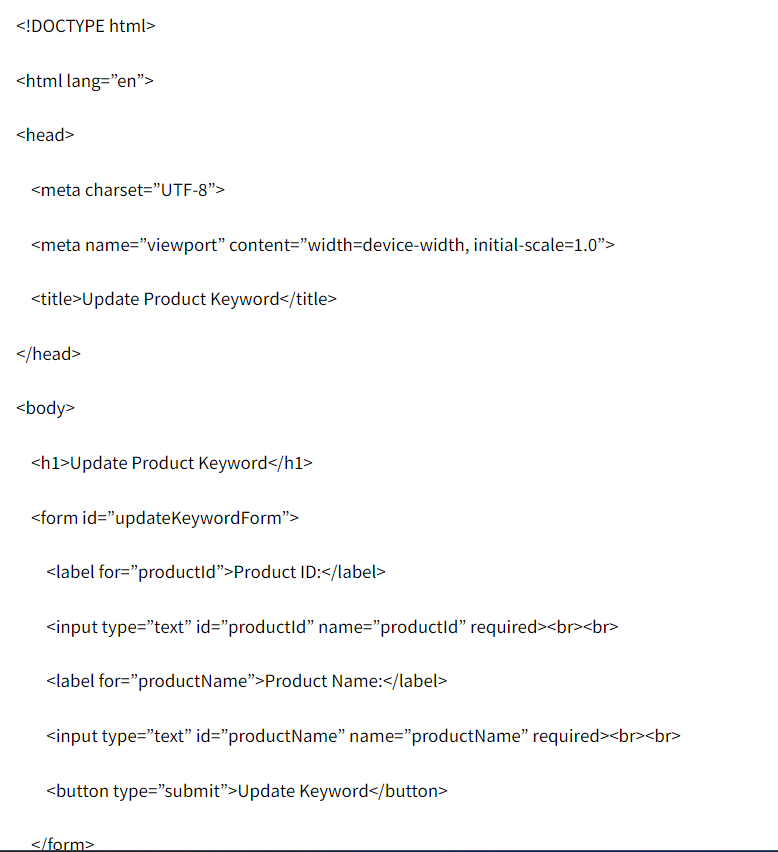
        Document.getElementById(‘updateKeywordForm’).addEventListener(‘submit’, function(event) {
            Event.preventDefault();
            Let productId = document.getElementById(‘productId’).value;
            Let productName = document.getElementById(‘productName’).value;
            // Simulate updating the ‘Keyword’ field based on conditions
            Let updatedKeyword = (productName && productName.startsWith(‘A’)) ? ‘Category A’ : ‘Other Category’;
            // Display a message (for simulation purposes, not actual Salesforce integration)
            Alert(`Keyword updated to: ${updatedKeyword}`);
        });
[removed]