How can I handle a scenario where I need to update a read-only property in the JS script?

953    Asked by david_2585 in Salesforce , Asked on Jun 24, 2024

Imagine there is a scenario where I am currently working on a web development project where I have a javascript object that represents the profile information of the users. This object has a property called “email” which is initially set as read-only because it is retrieved from an API and should not be modified directly. However, I need to update this “email” property due to a user action. How can I handle this particular scenario without violating the read-only property constraint? 

Answered by Dominic Poole

 In the context of Salesforce, you handle the scenario where you need to update a read-only property in a javascript object, by using the concept of property descriptors and object.defineProperty() or object.defineproperties().

Here is how you can do so:-

// Define the user object with a read-only email property

Let user = {
  Name: “John Doe”,
  Get email() {
    Return john.doe@example.com;
  }
};

// Attempt to modify the read-only email property

Try {
  User.email = newemail@example.com; // This will throw an error
} catch (error) {
  Console.error(“Error:”, error.message);
}

// Define a new writable email property using Object.defineProperty

Object.defineProperty(user, “email”, {
  Value: newemail@example.com,
  Writable: true,
  Enumerable: true,
  Configurable: true
});

Console.log(“Updated Email:”, user.email); // Outputs: Updated Email: newemail@example.com

Here is the example given in python programming:-

Class UserProfile:
    Def __init__(self, name, email):
        Self._name = name
        Self._email = email
    @property
    Def email(self):
        Return self._email
    @email.setter
    Def email(self, new_email):
        If hasattr(self, ‘_email’) and not hasattr(self, ‘_email_updated’):
            Self._email_updated = True
            Self._email = new_email
        Else:
            Raise AttributeError(“Cannot assign to read-only property ‘email’”)
# Creating an instance of UserProfile
User_profile = UserProfile(“John Doe”, john.doe@example.com)
# Trying to directly assign a new email (will raise an error)

Try:

    User_profile.email = newemail@example.com
Except AttributeError as e:
    Print(“Error:”, e)
# Updating email using setter method
User_profile.email = newemail@example.com
Print(“Updated Email:”, user_profile.email) # Outputs: Updated Email: newemail@example.com

Here is the example given in HTML :-
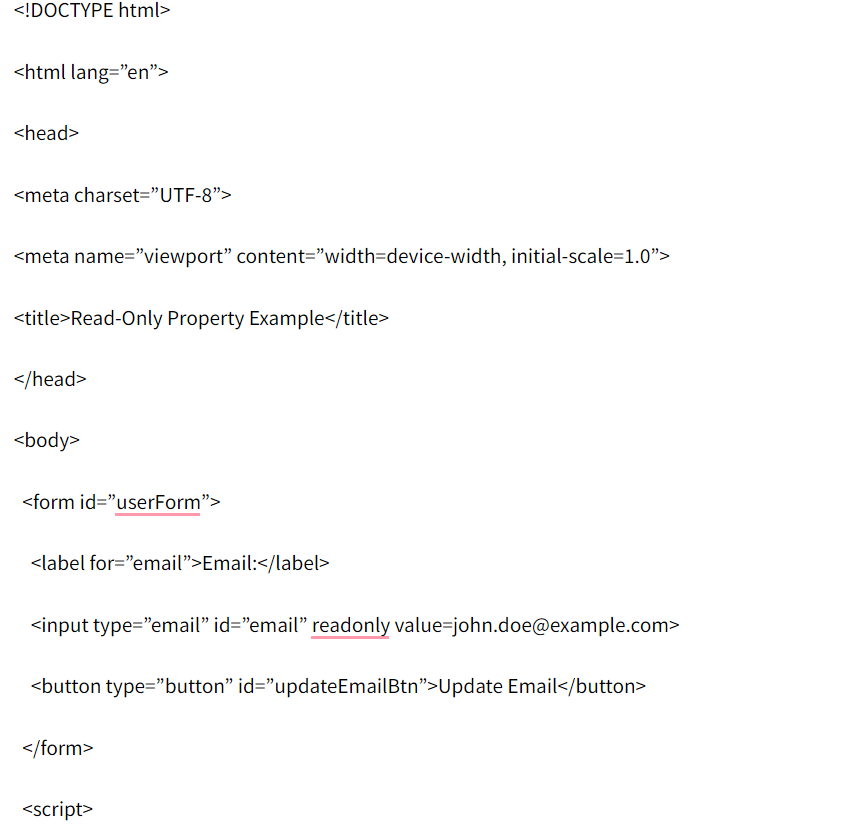

    Document.getElementById(“updateEmailBtn”).addEventListener(“click”, function() {
      Var emailInput = document.getElementById(“email”);
      Var newEmail = prompt(“Enter new email:”);
      If (newEmail && newEmail !== “”) {
        emailInput.value = newEmail;
      }
    });

  [removed]



Your Answer

Answers (9)

In this situation, you can handle the update without directly violating the read-only constraint by avoiding mutation of the original object and instead creating a new updated version of it. Since the “email” property is marked as read-only to protect the integrity of data coming from the API, the best practice is to treat the object as immutable. When a user action requires updating the email, you can create a shallow copy of the original object using techniques like the spread operator or Object.assign(), and then override the “email” field in the new object. This way, the original object remains unchanged while the updated object reflects the new value. Alternatively, you can manage the email separately in a controlled state (such as using state management in frameworks like React) and then sync it back to the server through an API call. This approach respects the read-only constraint, maintains predictable data flow, and ensures your application remains clean an what are the best rizz lines

2 Months

In cases like this, I usually avoid mutating the original object and instead create a new one with the updated email (or use a setter/update method that the API layer allows). It reminds me of how Drive Mad levels feel: you can’t force the “rules,” but you can find a clean path around constraints without breaking anything.

4 Months

To tackle updating the read-only "email" property, you can use a method to create a copy of the object with the updated email instead of altering the original directly. This way, you adhere to the read-only constraints. Additionally, if you need a fun break from coding, you might enjoy a quick game of Run 3—it’s a great way to relax and recharge! Good luck with your project!


6 Months

That's an interesting problem! I've run into similar situations where you want to bend the rules a little without breaking everything. Instead of directly modifying the read-only "email" property, could you create a new object with the updated email? Or perhaps use a separate, mutable "tempEmail" property that's only used for updating. It's a bit like choosing your path carefully when you're navigating tricky terrain in Snow Rider 3D – you want to find the best route without crashing! This way, you keep the original read-only data intact while still allowing for user-driven changes.


7 Months
Based on the examples provided in JavaScript and Python, you're asking how to demonstrate the same concept—updating a read-only property—in HTML. milestone credit card


However, this is not possible because HTML is a markup language, not a programming language. It is used to structure and display content on a web page. It doesn't have variables, objects, or properties in the same way that JavaScript or Python do. You can't define or manipulate a "read-only property" directly within HTML.
9 Months

Instead of directly changing the ”email“ field, it may be the best approach to create a clone of the object and use it updated with a new email value, so that the data is updated without violating the ”read-only" restriction of the original object, you can try it out, you can also have a good time with basketball legends, fun can motivate you to work.

1 Year

@geometry dash meltdown Have you been involved for a long time and what is your goal?

1 Year

Use git log to find the space wave where the mistaken merge occurred. Find the commit message indicating the merge.

1 Year

@wordle unlimited To handle updating a read-only property in JavaScript, you can use the `Object.defineProperty()` method to temporarily change the property's configuration, allowing you to update it and then set it back to read-only. Another approach could be creating a new object instance with the updated property while keeping the original object intact.

1 Year

Interviews

Parent Categories