

About this question
I want to part 2 columns in my record edit form because it has too many fields.
I want to part 2 columns in my record edit form because it has too many fields.
Log in to share your answer and help other learners.
Log in to answerBest Answer · By JanBask Salesforce Expert
Answered on Jul 2, 2024
To create a multi-column layout for your lightning recordeditform, use the Grid utility classes in Lightning Design System. This example creates a two-column layout. Reference
Best Answer · By JanBask Salesforce Expert
Ranjana Admin JanBask Expert
Answered on Jul 2, 2024
To create a column in the lightning:recordEditForm component in Salesforce Lightning, you need to use layout components like lightning:layout and lightning:layoutItem. This allows you to arrange your form fields in columns. Here's an example of how to do this:
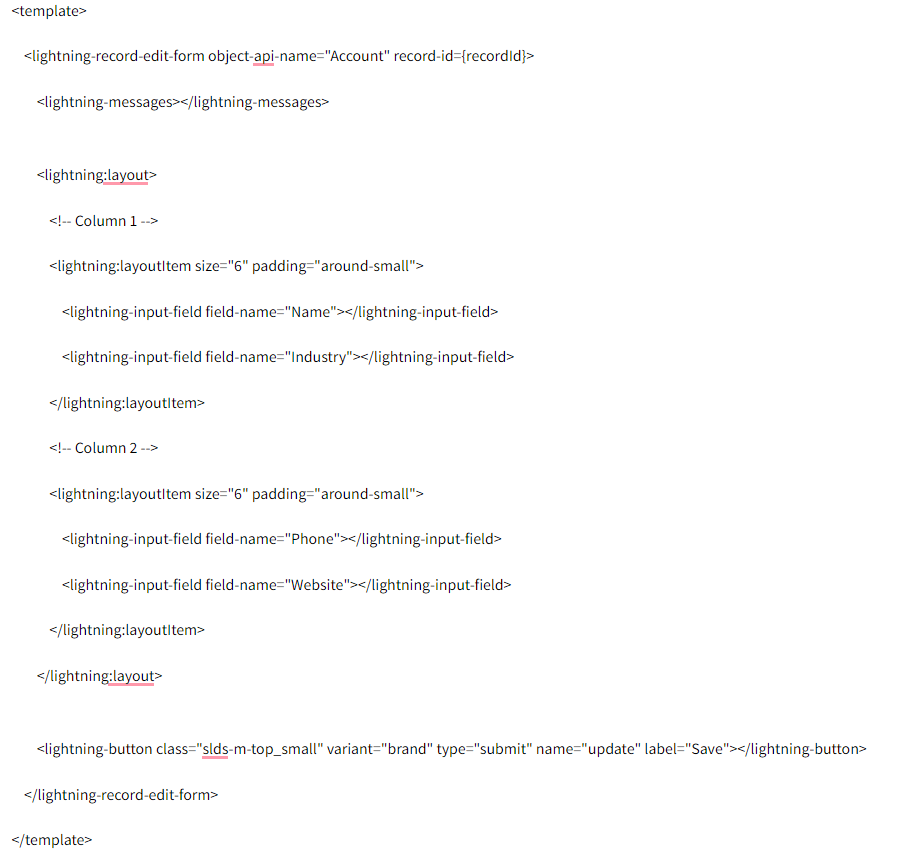
Explanation:
lightning-record-edit-form: This component creates a form that allows you to edit a record. The object-api-name attribute specifies the object, and the record-id attribute specifies the record you want to edit.
lightning-messages: This component displays any error messages related to the form.
lightning
: This component is used to create a flexible grid system to arrange the form fields in columns.
lightning
: This component represents an item within the lightning:layout. The size attribute specifies the width of the column. In this example, size="6" means each column will take up half of the available width (12 is the total grid size).
lightning-input-field: This component is used to add individual form fields. The field-name attribute specifies the API name of the field you want to include in the form.
lightning-button: This component adds a button to the form. In this case, it's a submit button with the label "Save".
By arranging lightning-input-field components within lightning:layoutItem components, you can create a multi-column layout for your lightning-record-edit-form. Adjust the size attribute to control the width of the columns as needed.
Pbu22308 Latest answer
Answered on Mar 17, 2026
Enhanced gameplay appeal thrives on unpredictability survival race
Answered on Nov 18, 2025
When taking part in a raid, every move needs to be carefully made, as Brainrot carries a slow speed and any small change can determine success or failure. This strategic element makes each raid in Steal Brainrot Online an emotional and challenging experience.
Answered on May 16, 2025
To create a column in the lightning recordeditform, you can use the lightning-layout and lightning-layout-item components to structure your fields into columns. This layout gives you more control over field arrangement, especially for responsive design. It is a bit like building levels in Geometry Dash—planning the structure carefully leads to smoother performance and better user experience.
Answered on Mar 10, 2025
What are group interviews? Understand their format, purpose, and the best ways to prepare so you can confidently showcase your skills and land the job.
Answered on Mar 5, 2025
Premium Female Delhi escort service legal status in Delhi and his parameters– The legitimate status is exceedingly confounded and ambiguous in Delhi including Delhi.
Answered on Jan 6, 2025
Select the record form you want to edit.
Drag and drop elements from the left panel onto the form. To create a new column, you can drag a "Section" onto the form Block Blast and then add fields to this section.
Thanks!
Answered on Jul 22, 2024
To insert certain form fields, you can utilize this component. To add an API field to a form, you can use the field-name attribute to specify its name.
This part enhances the form by including a button run 3. The button here is labeled "Save" and it's a submit button.
You may make your lightning-record-edit-form have several columns by ordering the lightning-input-field components inside.
Free tutorials and interview questions from industry experts — learn the skill, then get ready to prove it.
Step-by-step Salesforce guides from industry experts
Common Salesforce interview questions, answered
Guides, tips and career advice on Salesforce from JanBask experts.
 Salesforce How to Prepare for Salesforce Developer Certification: A Practical Guide
A step-by-step guide to Salesforce Developer certification - what to study for PD1, how PD2 fits in, and how to know you're ready…
Salesforce How to Prepare for Salesforce Developer Certification: A Practical Guide
A step-by-step guide to Salesforce Developer certification - what to study for PD1, how PD2 fits in, and how to know you're ready…
 Salesforce Salesforce Developer Certification Guide: Everything You Need to Know in 2026
Learn about Salesforce Developer Certification, including exam requirements, cost, topics, preparation time, retakes, and career…
Salesforce Salesforce Developer Certification Guide: Everything You Need to Know in 2026
Learn about Salesforce Developer Certification, including exam requirements, cost, topics, preparation time, retakes, and career…
 Salesforce How to Prepare for Salesforce Admin Certification: A Practical Study Guide
Get a practical study plan for the Salesforce Admin exam - weighting by section, how to use Trailhead effectively, and how to…
Salesforce How to Prepare for Salesforce Admin Certification: A Practical Study Guide
Get a practical study plan for the Salesforce Admin exam - weighting by section, how to use Trailhead effectively, and how to…
 Salesforce Salesforce Developer Salary Guide: How much you can earn
Discover the real Salesforce developer salary in 2026 by experience, location, skills & certifications. See what actually boosts…
Salesforce Salesforce Developer Salary Guide: How much you can earn
Discover the real Salesforce developer salary in 2026 by experience, location, skills & certifications. See what actually boosts…