Log in to share your answer and help other learners.
Log in to answerBest Answer · By JanBask Salesforce Expert
Answered on Aug 5, 2021
Compiler is complaining about aura:if because you're using assignment (=) instead of conditional operator (==), in the second condition: (editMode='true'). Also you should know that AND function is case sensitive.
Second problem mentioned by Jayant would give a problem at run time.
You need to change:
isTrue="{!AND(v._candidateDetails.contact.Nationalite__c != null), (editMode='true'))}"to:
// not should if there is a typo as attribute _candidateDetails starts with an Underscore isTrue="{!and(v._candidateDetails.contact.Nationalite__c != null), (v.editMode=='true'))}"Ranjana Admin JanBask Expert Latest answer
Answered on Jun 14, 2024
In Salesforce's Aura components, the aura:if component is used to conditionally render content based on an expression. The isTrue attribute of aura:if accepts a boolean expression to determine whether the content inside should be rendered.
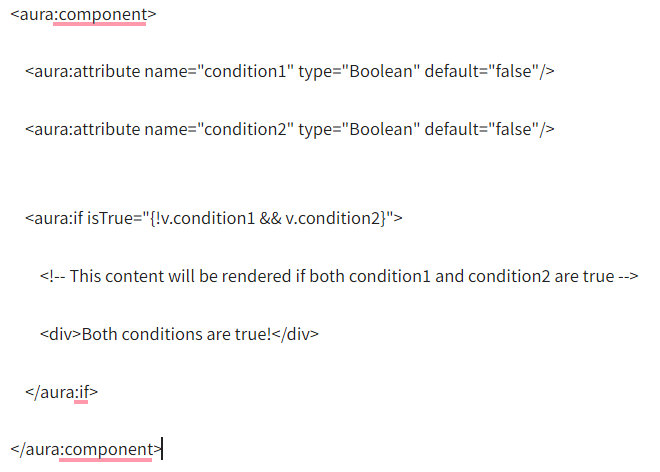
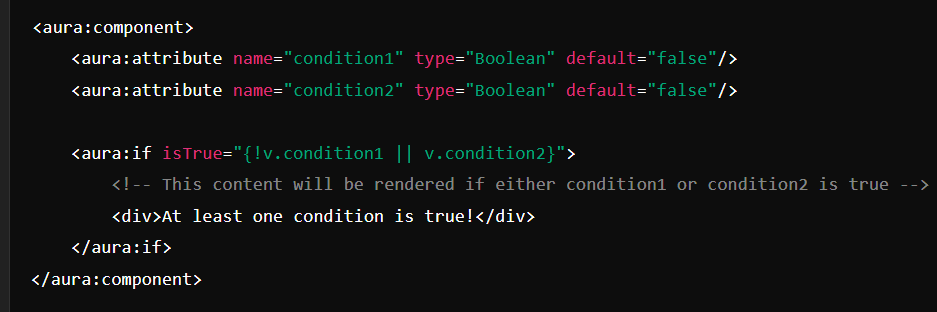
To handle multiple conditions, you can use logical operators (&& for AND, || for OR) within the isTrue parameter. Here’s how you can do it:
Using aura:if with Multiple Conditions
Example with AND Condition (&&)
Example with OR Condition (||)
Handling More Complex Conditions
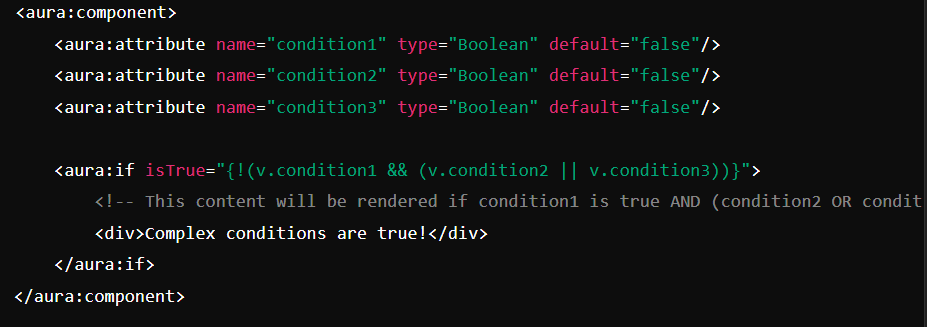
You can also combine multiple conditions with both AND and OR logical operators. Make sure to use parentheses to group conditions correctly and ensure the logical operations are evaluated in the desired order.
Example with Complex Conditions
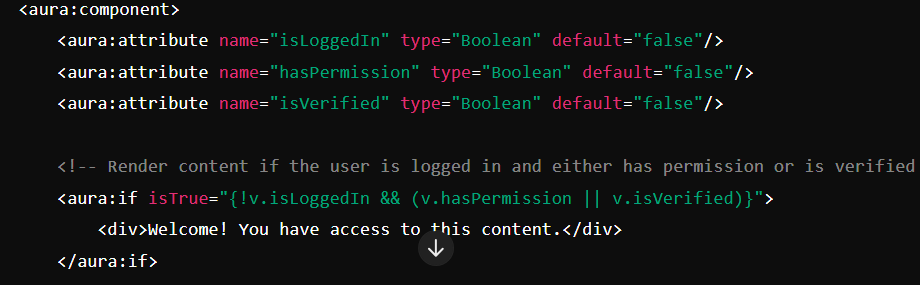
Practical Example
Here's a practical example that combines these concepts into a single Aura component.
Summary
These examples should help you implement complex conditional rendering in your Aura components using the aura:if component.
Free tutorials and interview questions from industry experts — learn the skill, then get ready to prove it.
Step-by-step Salesforce guides from industry experts
Common Salesforce interview questions, answered
Guides, tips and career advice on Salesforce from JanBask experts.
 Salesforce How to Become a Salesforce Developer Without Experience
No coding background? Learn how to become a Salesforce Developer step by step - skills to build, projects to create, and how to…
Salesforce How to Become a Salesforce Developer Without Experience
No coding background? Learn how to become a Salesforce Developer step by step - skills to build, projects to create, and how to…
 Salesforce How to Become a Salesforce Admin With No Experience
No Salesforce Admin experience? Learn how to build real skills, create projects, and land an entry-level Salesforce Admin job…
Salesforce How to Become a Salesforce Admin With No Experience
No Salesforce Admin experience? Learn how to build real skills, create projects, and land an entry-level Salesforce Admin job…
 Salesforce How Long Does It Take to Become a Salesforce Developer?
Wondering how long to learn Salesforce Developer? Most beginners need 6–12 months. See the study time, stage-by-stage roadmap and…
Salesforce How Long Does It Take to Become a Salesforce Developer?
Wondering how long to learn Salesforce Developer? Most beginners need 6–12 months. See the study time, stage-by-stage roadmap and…
 Salesforce How Long Does It Take to Become a Salesforce Admin?
Wondering how long to learn Salesforce Admin? Most beginners need 3–6 months. See the study time, stage-by-stage roadmap and…
Salesforce How Long Does It Take to Become a Salesforce Admin?
Wondering how long to learn Salesforce Admin? Most beginners need 3–6 months. See the study time, stage-by-stage roadmap and…

